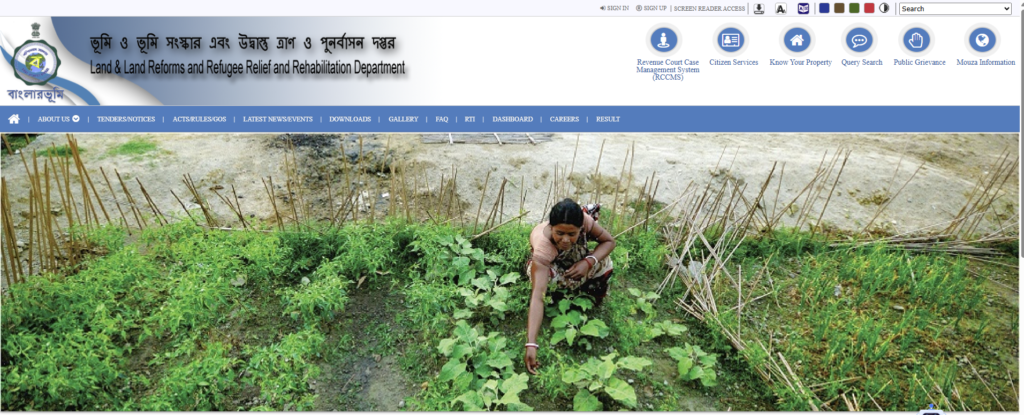
Whether you are buying farmland in Murshidabad, checking your family plot in Malda, or verifying a property deal in Nadia, the first thing you must do is check the official land records. In West Bengal, all land records are available online through a single portal: Banglarbhumi (banglarbhumi.gov.in).
This guide walks you through every step — from basic searches to downloading certified documents — so you can verify any piece of land in West Bengal without visiting a single government office.
What is Banglarbhumi?
Banglarbhumi is the official online land records portal of West Bengal, managed by the Land & Land Reforms and Refugee Relief & Rehabilitation Department (L&LR & RRR). Launched in 2011 and continuously updated since, the portal covers over 4.30 crore Khatian records across 42,159 mouzas (revenue villages) in all 23 districts of the state.
The portal lets you do the following from your phone or computer:
- Search land ownership details by Khatian number or plot number
- View mouza maps showing plot boundaries
- Check RS-LR (Revisional Survey to Land Reforms) plot mapping
- Download certified RoR (Record of Rights) copies — known as e-Porcha
- Apply for mutation (transfer of ownership) online
- Apply for land conversion (agricultural to non-agricultural) online
- Pay Khajna (land revenue) online
- Track application status and file grievances
Before you start: Key terms you need to know
If you are new to Bengal’s land record system, these terms will appear repeatedly:
Khatian — The main land record document that identifies a plot. It contains the owner’s name, land area, plot number, classification, and rights. Think of it as the “identity card” of a piece of land.
Dag number (Plot number) — The unique number assigned to each plot of land within a mouza. One Khatian can contain multiple Dag numbers if the owner holds several plots.
Mouza — The smallest revenue unit in Bengal, roughly equivalent to a village. Every piece of land belongs to a specific mouza.
JL number (Jurisdiction List) — A number that identifies the mouza within a block. You need the JL number to locate the correct mouza on the portal.
RoR (Record of Rights) / Porcha — The official legal document that proves land ownership. The digital version available on Banglarbhumi is called e-Porcha.
RS and LR — RS stands for Revisional Survey (the latest survey), and LR stands for Land Reforms (the earlier survey). The portal lets you cross-verify both to catch discrepancies.
Bargadar — A registered sharecropper who has legal rights over the land they cultivate. Bargadar rights are a critical check point when buying land in Bengal.
How to check land records: Step by step
Method 1: Quick search (no registration needed)
This is the fastest way to check basic Khatian and plot information. You do not need to register or log in.
Step 1: Open your browser and go to banglarbhumi.gov.in
Step 2: On the homepage, click on “Know Your Property” under the Citizen Services section.
Step 3: Select your District from the dropdown menu (for example, Murshidabad).
Step 4: Select your Block (for example, Kandi).
Step 5: Select your Mouza (the specific village where the land is located). If you know the JL number, you can use that to find the mouza faster.
Step 6: Choose your search method:
- Search by Khatian — if you know the Khatian number
- Search by Plot — if you know the Dag (plot) number
Step 7: Enter the number, complete the captcha, and click “View”.
Step 8: The land record will display showing: owner’s name, father’s name, land area (in acres, hectares, or local units), land classification (agricultural, homestead, etc.), and plot details.
Important note on Khatian number format: If the Khatian number is in the format 395/2, enter “395” in the box before the slash and “2” in the box after the slash. Many people get stuck here because they enter the full number in one box.
Method 2: Registered user (for advanced services)
Registration unlocks additional services: downloading certified e-Porcha, applying for mutation, paying Khajna, and tracking applications.
How to register:
- Go to banglarbhumi.gov.in and click “Sign Up”
- Fill in: your full name, address, parent’s name, district, mobile number, email, and create a password
- Enter the captcha and click Submit
- Verify through the OTP sent to your mobile and email
- Click the activation link in your email
- You can now log in with your username and password
After logging in, you can access:
- Citizen Services → Know Your Property — same as the quick search but with download options
- Online Application → Mutation Application — apply for ownership transfer after buying land
- Online Application → Conversion Application — apply to change land classification
- Online Application → Fees Payment — pay Khajna, mutation fees, and conversion fees online
- Citizen Services → RS-LR Information — cross-verify old and new survey records
How to download e-Porcha (certified RoR copy)
The e-Porcha is a digitally signed, legally valid copy of your land record. You need it for property transactions, bank loans, and government scheme applications.
Step 1: Log in to your Banglarbhumi account.
Step 2: Go to Citizen Services → Service Delivery.
Step 3: Select “RoR Request” and fill in the property details (district, block, mouza, Khatian/plot number).
Step 4: Upload supporting documents if required.
Step 5: Pay the prescribed fee online.
Step 6: Save your acknowledgment slip with the GRN (Government Reference Number).
Step 7: Track your application under Citizen Services → GRN Search or Application/GRN Search.
Step 8: Once processed (usually within 2-4 weeks), download the certified e-Porcha as a PDF.
How to check mutation status
After buying land and registering the deed, you must apply for mutation (namjari) to update the ownership records. Here is how to track the status:
Step 1: Log in to Banglarbhumi.
Step 2: Go to Online Service Status → Mutation Status.
Step 3: Search by either your application number or deed details (deed number, year, and Sub-Registrar office).
Step 4: Click “Search” to see the current status of your mutation application.
If your mutation has been pending for more than 6 months, use the Grievance section on the portal to file a complaint. Note the grievance tracking number for follow-up.
How to view mouza maps
Mouza maps show the physical layout of all plots within a mouza, including boundaries, plot numbers, and adjacent plots. This is invaluable for verifying that the plot the seller is showing you physically matches the official records.
Step 1: On the homepage, click “Know Your Property” or go to Citizen Services.
Step 2: Select your District, Block, and Mouza.
Step 3: Look for the “Map View” or “Plot Map” option.
Step 4: The map displays all plots with their Dag numbers. You can identify your plot and check its boundaries against neighbouring plots.
Tip: Take a screenshot of the mouza map and carry it when you visit the land physically. Walk the boundaries and compare them with the map. If there is a significant mismatch, the plot may have encroachment issues that need to be resolved before purchase.
7 red flags to check before buying land in West Bengal
Banglarbhumi gives you the data, but you need to know what to look for. Here are the seven critical checks every land buyer must perform:
1. Owner name mismatch
The seller’s name must exactly match the name in the Khatian record. If the owner in the records is deceased and the seller is an heir, they must have a legal succession certificate or a registered family settlement deed. Do not proceed without this.
2. Land classification
Check whether the land is classified as “agricultural,” “homestead,” “vested,” or “khas.” If it is classified as Vested land (ceiling surplus land acquired by the state), it cannot be legally sold. This is one of the most common traps in Bengal land transactions.
3. Bargadar (sharecropper) registration
Search the land records for any registered Bargadar on the plot. A Bargadar has legal cultivation rights under the West Bengal Land Reforms Act, and these rights survive a sale. Buying land with an existing Bargadar creates immediate legal complications. Always verify at the BL&LR office in addition to the online check.
4. Multiple owners
Many plots in Bengal have multiple co-owners due to inheritance. All co-owners must consent to the sale and sign the deed. If even one co-owner refuses, the sale can be challenged in court. Check the Khatian carefully for the number of owners listed.
5. RS-LR mismatch
Use the RS-LR Information service to cross-verify the older survey (LR) data with the latest survey (RS) data. If the plot area or boundaries differ between the two records, there may be an unresolved dispute that could affect your purchase.
6. Pending mutation or conversion
If the seller recently acquired the land, check whether the mutation has been completed in their name. If not, the land records still show the previous owner, and you are essentially buying from someone who has not yet been officially recorded as the owner.
7. Encumbrance
Banglarbhumi does not directly show encumbrance (loans, mortgages, or court attachments). For this, you need to obtain a separate Encumbrance Certificate (EC) from the Sub-Registrar office. Always get a 15-year EC before finalising any purchase.
Using the Banglarbhumi mobile app
The JomirTothya app is the official mobile application from the West Bengal Land Department. Available on the Google Play Store, it supports Bengali, English, and Devanagari. The app lets you:
- Check Khatian and plot details
- View RS-LR data and land classification
- Access mouza maps
- Calculate market value, stamp duty, and fees
- Make online payments for mutation and conversion
The app is convenient for quick on-site checks when you are physically visiting land. Download it and save your frequently searched mouzas for faster access.
Important contacts
If you face issues with the portal or need assistance with land records:
- Director of Land Records & Survey: 35 Survey Building, Gopal Nagar Road, Kolkata-700027
- Phone: 033-2479-5726
- Email: dlrswb.grievancecell@gmail.com
- Portal grievance: Use the Grievance section on banglarbhumi.gov.in
For property deed registration (a separate process from land records), use the IGRWB portal at wbregistration.gov.in.
Next steps after verifying land records
Once you have confirmed that the land records are clean, the owner is genuine, and there are no red flags, use our free tools to make an informed financial decision:
Land Cost Estimator — Compare prices across 10 West Bengal districts with block-wise breakdowns, stamp duty calculator, and full registration cost analysis. Available free at FarmingBengal.in/free-tools/
Timber ROI Calculator — If you are buying agricultural land for timber plantation, estimate your returns across Mahogany, Teak, Melia Dubia, Sandalwood, and Agarwood. Also at FarmingBengal.in/free-tools/
For a detailed walkthrough of the complete land buying process — from identifying plots to completing mutation — read our companion article: Land Buying Guide for Kandi Sub-Division, Murshidabad.
Published on FarmingBengal.in — Your farming and land investment guide for Bengal Category: Land Investment | Reading time: 11 minutes